Train and Register Models with Amazon SageMaker
In this section, we will train a machine learning model with Amazon SageMaker using preprocessed data from Lambda and stored on S3. This is an important step to create a model that is ready to serve inference via API later.
🎯 Objectives
-
Learn how to create a SageMaker Training Job from processed data.
-
Configure training parameters and choose algorithms.
-
Register the model (Model Registry) for later deployment.
-
Manage model versions and track training progress.
📚 Contents
- 5.1 Prepare input data for SageMaker
- 5.2 Create SageMaker Training Job
- 5.3 Register model and manage version
- 5.4 Check training results
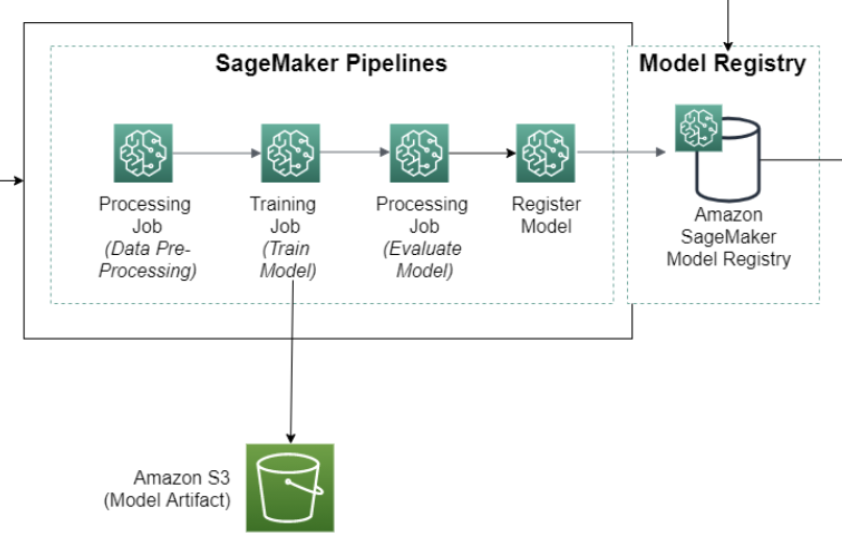
🧠 Architecture overview
-
Lambda creates processed data and saves it to the
processed/folder on S3. -
SageMaker reads data from S3, trains the model using the algorithm of your choice.
-
The resulting model is stored in
model/and can be registered in the Model Registry. -
The registered model will be used to deploy inference in the next step.
📦 Prerequisites
-
Completed Lambda Preprocessing Function (Chapter 4).
-
Has processed data in the
processed/folder of the S3 bucket. -
SageMaker IAM Role with access to S3, CloudWatch, and SageMaker.
✅ After completing this chapter, you will have a trained and registered ML model