Update Lambda to Write Data to DynamoDB
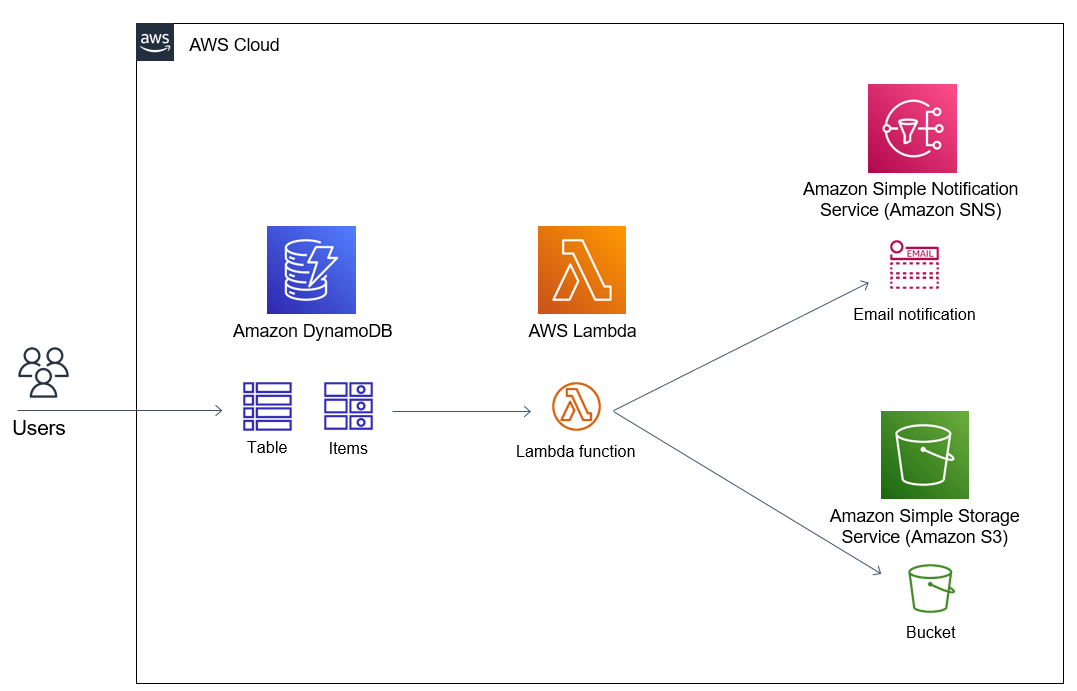
In this section, we will:
-
Update the Lambda inference function to write metadata each time the model is called into DynamoDB.
-
Verify that the data is written successfully.
-
Verify that the inference process is fully tracked.
🎯 Goals of this step:
-
Storing inference history: Record input data, results, processing time, and model information.
-
Easy Analysis & Debugging: Stored data helps track model behavior over time.
-
Integrated with Monitoring: Prepare for connecting to CloudWatch to monitor the pipeline.
🛠️ Update Lambda to write data to DynamoDB
- Open Lambda Function Inference
-
Go to AWS Lambda in the Management Console.
-
Select the Lambda function you created to call SageMaker Endpoint (e.g.,
ml-inference-lambda).

- Update Lambda source code
Replace the contents of the lambda_function.py file with the code below to write metadata to the InferenceMetadata table after each inference:
import json
import boto3
import os
import time
import uuid
from datetime import datetime

sagemaker = boto3.client('sagemaker-runtime')
dynamodb = boto3.client('dynamodb')

ENDPOINT_NAME = os.environ['ENDPOINT_NAME']
TABLE_NAME = os.environ['DYNAMODB_TABLE']

def lambda_handler(event, context):
# Parse input from API Gateway
body = json.loads(event['body'])
input_data = body['input']

# Call the SageMaker endpoint
start_time = time.time()
response = sagemaker.invoke_endpoint(
EndpointName=ENDPOINT_NAME,
ContentType='application/json',
Body=json.dumps(input_data)
)
prediction = json.loads(response['Body'].read())
latency_ms = int((time.time() - start_time) * 1000)

# Write metadata to DynamoDB
request_id = str(uuid.uuid4())
timestamp = datetime.utcnow().isoformat()

dynamodb.put_item(
TableName=TABLE_NAME,
Item={
'requestId': {'S': request_id},
'timestamp': {'S': timestamp},
'modelName': {'S': ENDPOINT_NAME},
'inputData': {'S': json.dumps(input_data)},
'prediction': {'S': json.dumps(prediction)},
'latencyMs': {'N': str(latency_ms)}
}
)

# Returns inference results
return {
'statusCode': 200,
'body': json.dumps({
'requestId': request_id,
'prediction': prediction,
'latencyMs': latency_ms
})
}
✅ Including:
-
ENDPOINT_NAME: deployed SageMaker Endpoint name.
-
TABLE_NAME: DynamoDB table name created in 8.1.
-
latencyMs: inference time, in milliseconds.
- Add environment variables to Lambda
-
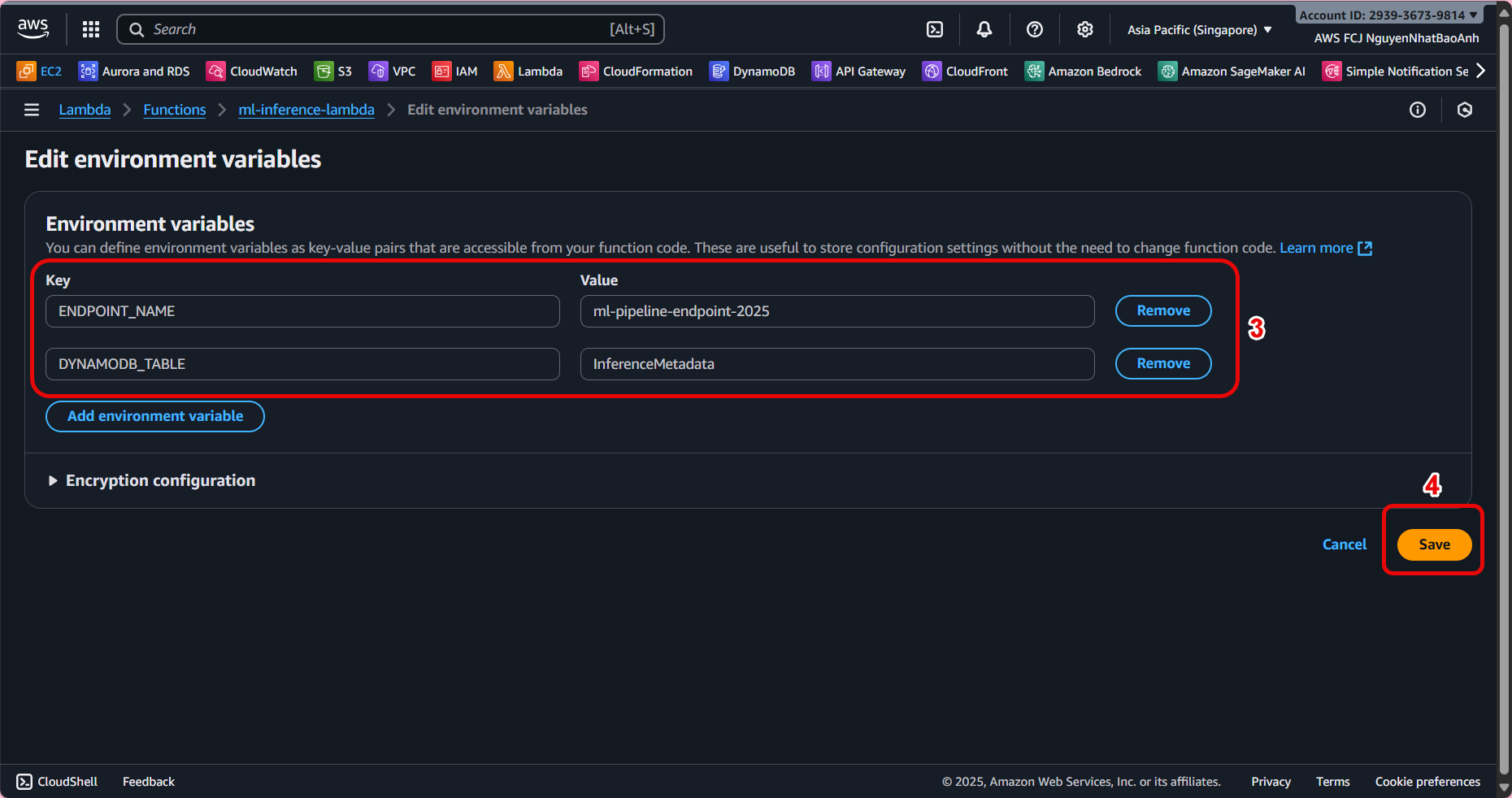
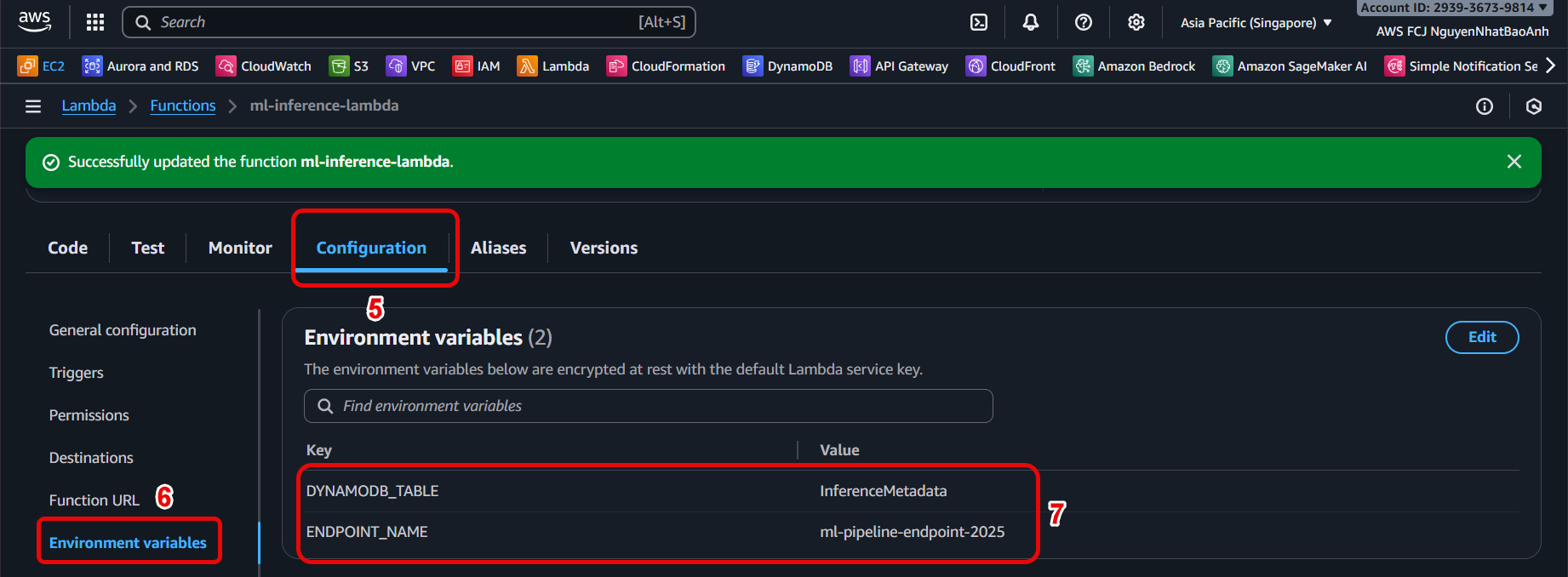
In Lambda configuration page → Configuration → Environment variables → Edit.
-
Add variables:
-
ENDPOINT_NAME = SageMaker endpoint name.
-
DYNAMODB_TABLE = InferenceMetadata.
 4. Check IAM access
- Make sure the Lambda role has permission to write data to DynamoDB as follows:
{
"Version": "2012-10-17",
"Statement": [
{
"Effect": "Allow",
"Action": [
"dynamodb:PutItem",
"dynamodb:DescribeTable"
],
"Resource": "arn:aws:dynamodb:<region>:<account-id>:table/InferenceMetadata"
}
]
}
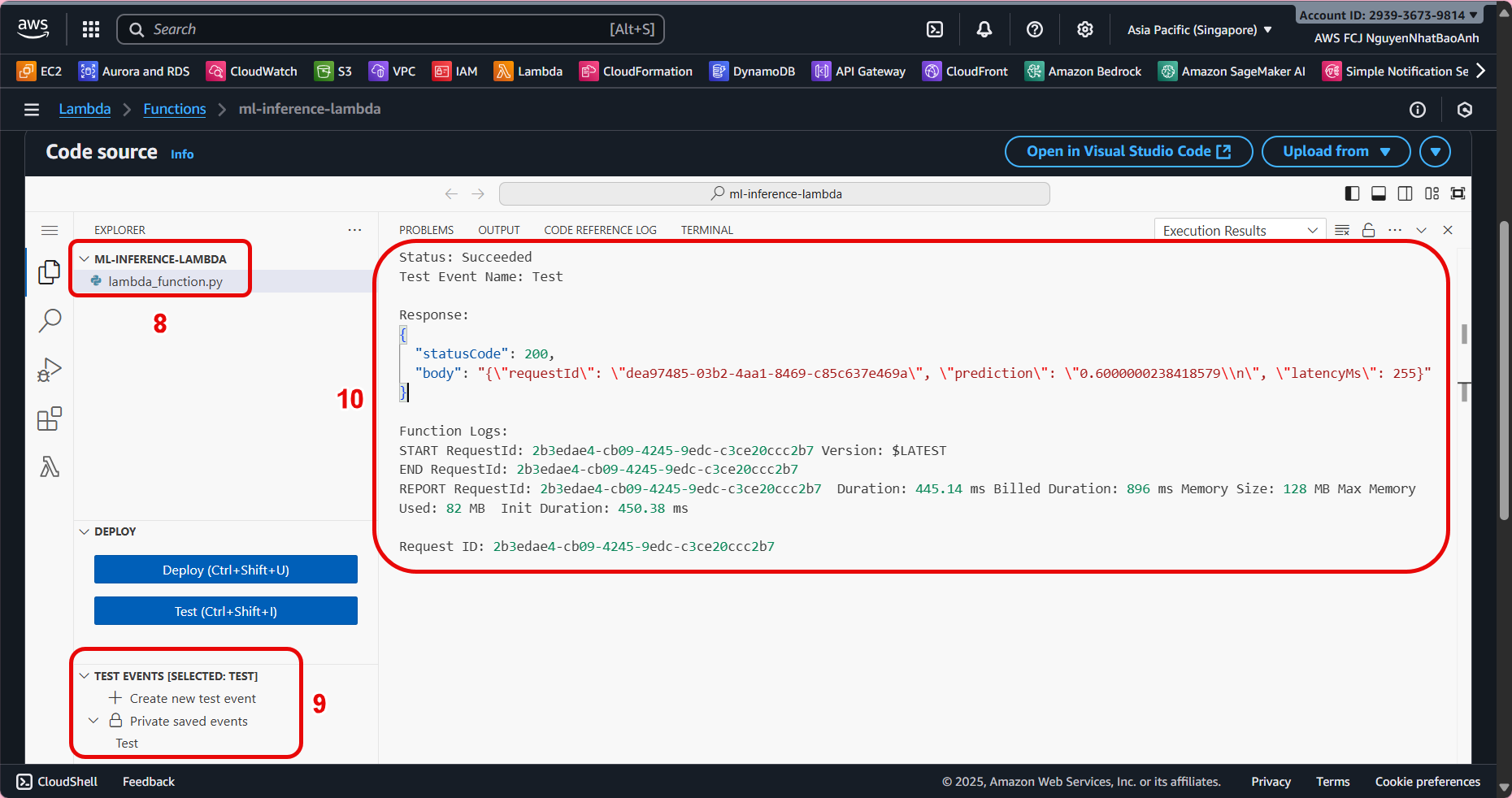
- Deploy and test Lambda
- Click Deploy to save changes.
- Use Test in Lambda Console or send a POST request to API Gateway as follows:
curl -X POST \
-H "Content-Type: application/json" \
-d '{"input": {"text": "Hello AI!"}}' \
https://<api-id>.execute-api.<region>.amazonaws.com/prod/inference
- Check the response contains requestId, prediction, and latencyMs.
- Verify data in DynamoDB
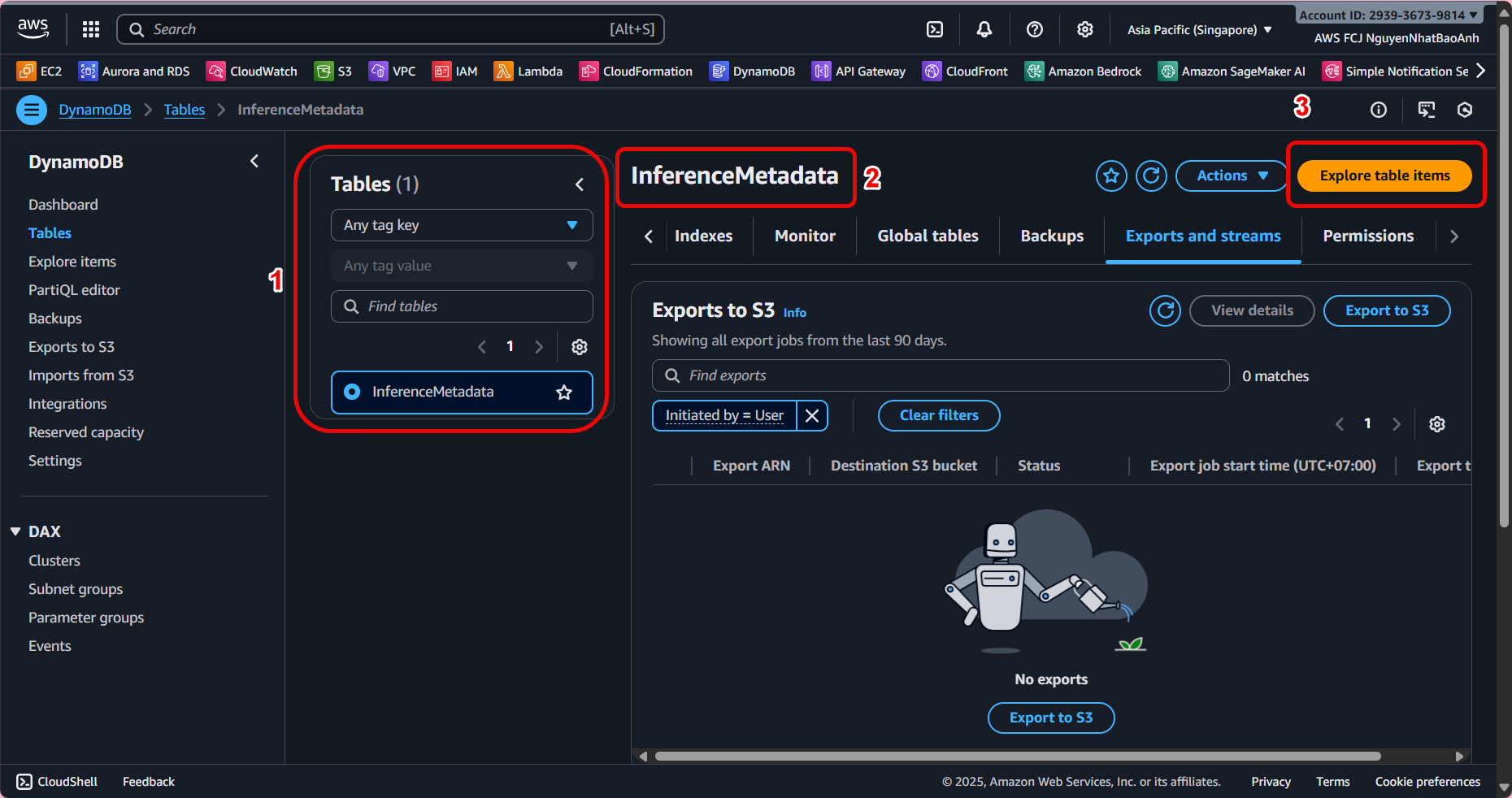
- Open the InferenceMetadata table in DynamoDB Console.
- Select Explore table items to view the data being logged.
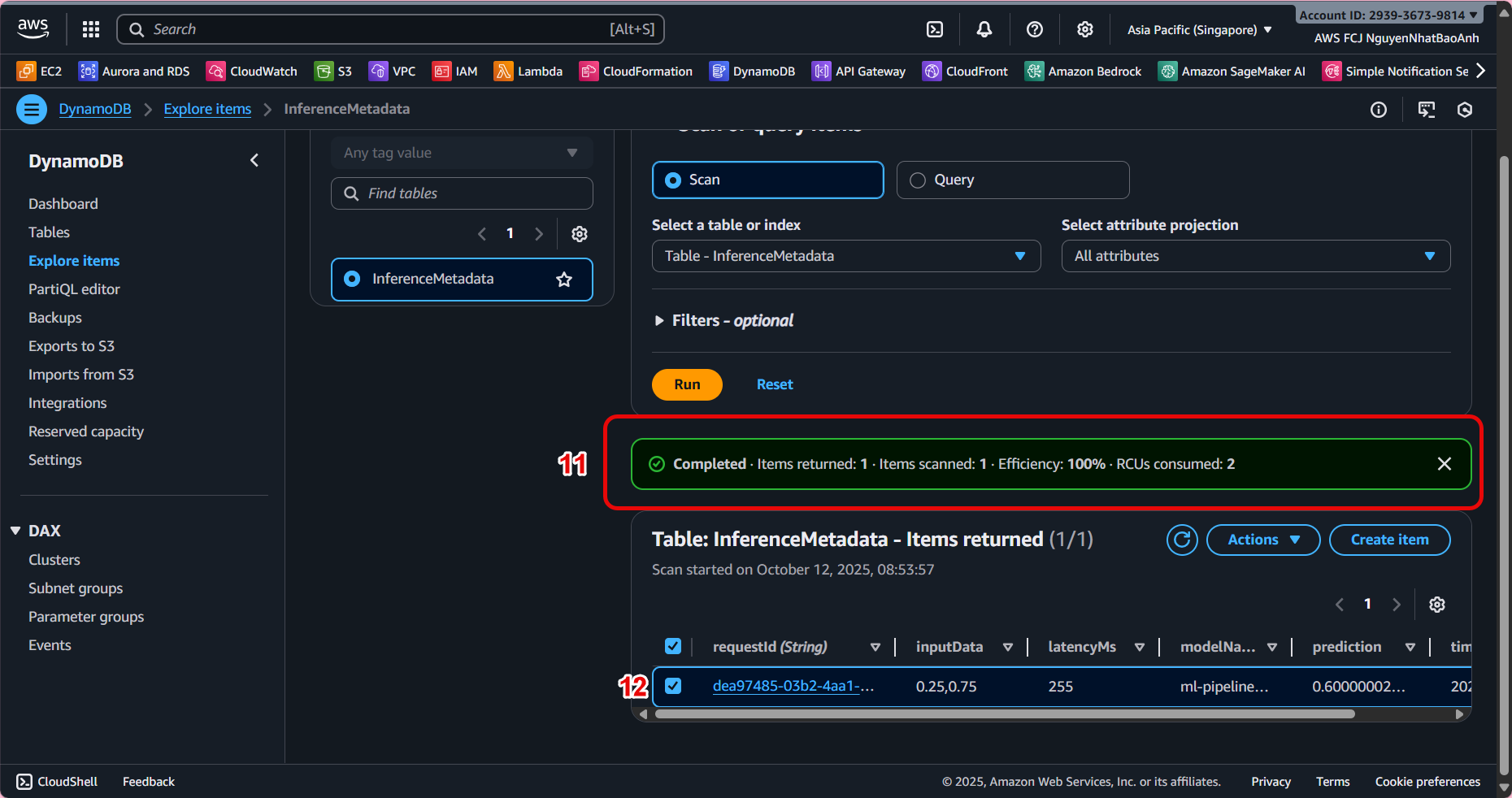 You should see the following logs:
| requestId | timestamp | modelName | inputData | prediction | latencyMs | |
|---|---|---|---|---|---|---|
| 6c1a4… | 2025-10-01T10:20:30Z | ml-endpoint | {“text”: “Hello AI!”} | {“result”: “positive”} | 134 |
If data is not written, check Lambda’s IAM permissions. Verify the DynamoDB table name and environment variable are correct. View the detailed log in CloudWatch Logs to debug the error.
✅ Done
- You have updated Lambda to automatically write metadata each time you inference to DynamoDB.
- This is an important step to connect the inference pipeline to the storage and monitoring system.